Sharpen a signature, then fit it — in that order
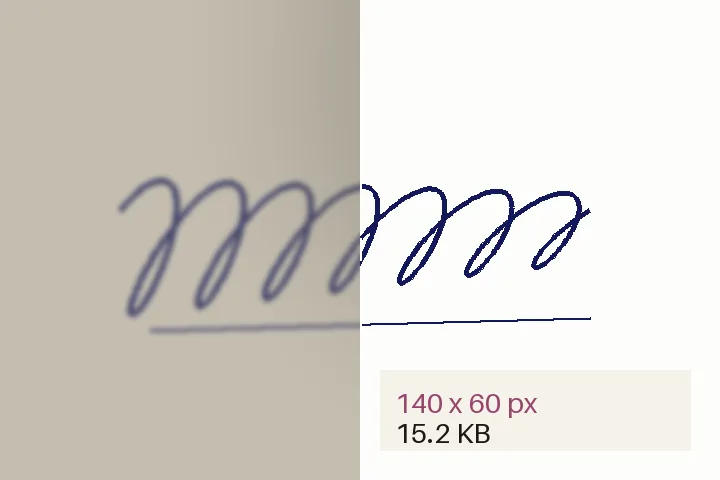
The order is the difference between a crisp file and a rejected one: crop, clean, sharpen, resize, sharpen again for the small grid, and only then encode. Compressing a sharpened full-size photo until it fits destroys the strokes; resampling first and searching the quality afterwards does not.
| Preset | Pixels | File size | Source |
|---|---|---|---|
| Bank exam signature (IBPS format) | 140 × 60 | 10–20 KB | primary, checked 2026-10-18 |
| SSC signature (commonly cited) | 472 × 157 | 10–20 KB | secondary, checked 2026-10-18 |
What this page will not do
It never generates or beautifies a signature, never claims that an authority will accept the file, and never stores it. The full sourced table and the reasons blurred uploads are rejected are in a clear signature for exam forms.
Related on this site
- For a declaration, a thumb impression or a photographed page: deblur text in an image.
- For a photograph already at its final size: sharpen after resizing.
- Sources, figures and the reasons uploads are rejected are in the signature guide.
Questions: sharpen a signature
What size should a signature be for bank exam forms?
IBPS-format bank recruitment notices — the Punjab & Sind Bank notice of October 2024 is one — give 140 × 60 pixels as preferred, 10–20 KB, JPG or JPEG, at 200 DPI or more. SSC figures commonly cited in secondary summaries are about 6.0 × 2.0 cm and 10–20 KB. Check your own notice: the presets carry their source and the date they were last checked.
Why was my signature rejected as blurred?
Usually because it was photographed on grey paper in uneven light, then squeezed to a few kilobytes by repeated compression. The grey and the shadow become blotches and the strokes soften. This page flattens the paper to white first, darkens the ink, sharpens the strokes at their own width, resamples to the exact pixels and only then searches the JPEG quality — so the band is reached without compressing the strokes away.
Will this change how my signature looks?
No. The strokes are never redrawn, smoothed, joined or reshaped. The paper is cleaned and the ink is darkened and sharpened as it is. The pen colour is kept unless you choose black.
Can I get it under 20 KB without making it blurry again?
Usually comfortably: a 140 × 60 signature on white paper is a small file even at high quality. The more common problem is the opposite — staying above a 10 KB minimum. Where the notice gives the pixels as preferred, the file is enlarged in the same shape until it reaches the minimum; it is never padded with noise or empty bytes. Where that is not allowed, the page tells you the minimum cannot be reached at those dimensions.
Is my signature stored or uploaded?
Neither. It is decoded and processed in this tab and is gone when the tab closes. Nothing is written to storage and there is no server that receives it.